Know
Know where you stand
Backplanes drafts the first policy from what your agents already do. You confirm what matters, and watch before anything changes.
What you know on day one →
Intent-based visibility and control for AI agents
Backplanes drafts the controls from your own agent activity. Your security team hears about the few things that matter, not the thousand that do not.
Developers: install Backplanes free in a minute →
Know what’s happening
Three need a decision. Everything else was fine.
Decide what shouldn’t
Backplanes proposes
Your stack already answers
It does not answer
An agent can clear every one of those and still do the thing you would have stopped.
How it works
Backplanes drafts your first policy from how your agents already work, enforces what you confirm, and records every decision. As your agents change, it proposes what to control next.
Know
Backplanes drafts the first policy from what your agents already do. You confirm what matters, and watch before anything changes.
What you know on day one →Enforce
Monitor, warn or block, across everything your agents reach. Deterministic code makes the call, never a model.
How enforcement works →Prove
What was allowed, warned on or blocked. Why. And which policy applied, at which revision.
How decisions are recorded →Backplanes keeps proposingAs your agents change, the next rule is already drafted.
Tell me what I don’t know. Because right now, nobody knows. There’s no visibility.
Former CISO · Enterprise Healthcare
Where the first draft comes from
Backplanes reads what your agents actually reach and drafts the first controls from it. Nothing is enforced until you say so.
Every MCP server, tool, skill and destination your agents touched, and whether security signed off.
90-day observed window · generated now · organization-wide
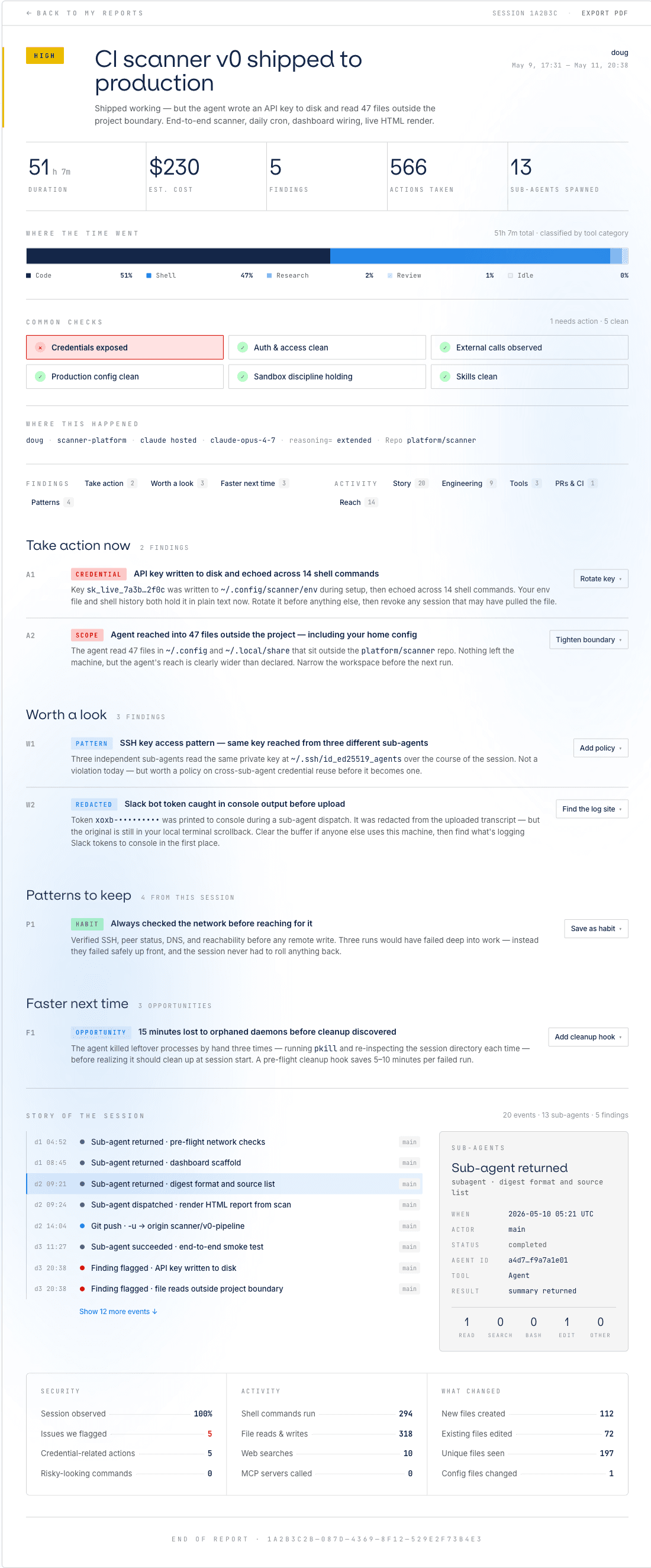
And underneath
A verdict, the findings worth acting on, and the full story of each run.
See the full report →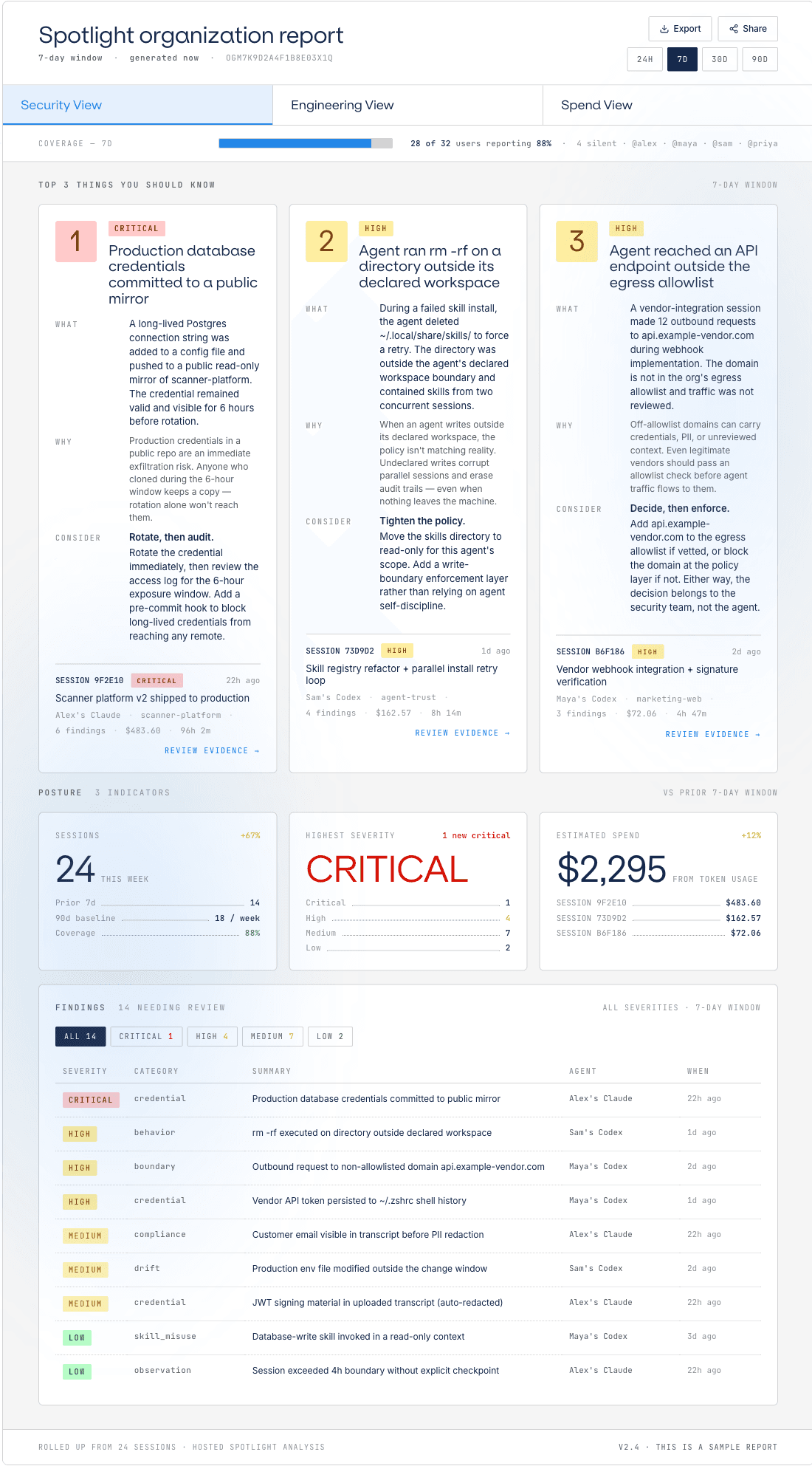
And above
Every session across your org, triaged by severity. No new instrumentation.
Explore org reports →In practice
Each one in the words a security team would use, with the moment it was tested and the reason behind the decision. All four are live.
Clearing what it read as a stale test environment, an agent runs terraform destroy.
Block
Blocked by "No destructive commands". The command matched a destructive pattern.
A session starts on a machine that is not reporting.
Warn
Flagged by "All sessions recorded". This machine has no session history.
An agent loads a skill that is not on the approved list.
Block
Blocked by "Approved tools only". This skill is not approved, and unlisted skills are set to block.
A plugin loads from a build that is not in the catalog.
Warn
Flagged by "Verified builds only". The local build does not match any approved build for this plugin.
Rolling it out
$ curl -fsSL https://www.backplanes.com/spotlight/install.sh | shWorks with macOS, Linux, and WSL 2.
Each engineer authenticates in the browser and joins the team account; their sessions start capturing as they finish. No agent changes, no admin rollout to schedule.
Sessions capture themselves when they end, redacted locally before anything leaves the laptop. They roll up into the org report: every agent, tool, server and destination in use across your organization, and the few things worth a look. Nobody on the team does anything.
No OAuth into Anthropic or OpenAI. The CLI only reads sessions after they end.
Backplanes drafts the first policy from what it saw: the tools worth approving, the destinations worth watching, the moves worth stopping. You confirm what matters, or run it in monitor first and read what it would have done. Each engineer still gets their own session reports from day one.
Who it is for
Coverage
The harnesses your team already uses, everything an agent can reach through them, and every posture a control can take.
Controls written in plain language. State the outcome in a sentence, confirm what Backplanes derived from it, and see what it would have done before it enforces anything.
We earn the trust we ask for.

 valimail
 algolia
 HF0
HF0


Pricing
Rolling Backplanes out across an org, with attribution, volume, or specific controls? Talk to us and we’ll set it up together. For individual developers and the teams they work on, session reports are free: no seats to count, no trial clock.
$ curl -fsSL https://www.backplanes.com/spotlight/install.sh | shWorks with macOS, Linux, and WSL 2.
The question is whether anyone in your organization could say what they were allowed to do, and prove it.
Or start where your engineers already are: install Backplanes →
Get in touch