
Solutions · Engineering and platform

A control they do not uninstall.

A control rarely dies in a breach. It dies when it gets in an agent’s way and the developer routes around it. So every rule starts in monitor, and a developer always sees which rule fired and why.

One command · Claude Code, Codex and Cursor · No agent changes

agent session

› resolving MCP servers for this session

~/checkout-api $ mcp: connect file-transfer.external

✕ blocked by Backplanes

policy: Approved tools only · rev 4

nobody in your org has approved this server

~/checkout-api $

How these actually fail

Security software on a developer machine rarely fails by being breached. It fails by being removed, routed around, or avoided by switching to the agent that does not trigger it. And it fails invisibly, because the sessions simply stop arriving.

Start by knowing

Start by reading one session end to end.

Before this is about control, it is a report your developers find useful on its own. That is deliberate. A tool they open voluntarily is still installed in month three.

One session, read back in full. What the agent was asked to do, what it did, and the evidence under every line.

← Back to my reportsSession 1A2B3C · Export PDF
High

CI scanner v0 shipped to production

Shipped working, but the agent wrote an API key to disk and read 47 files outside the project boundary. End-to-end scanner, daily cron, dashboard wiring, live HTML render.

dougMay 9, 17:31 to May 11, 20:38
  • 51h 7mDuration
  • $230Est. cost
  • 5Findings
  • 566Actions taken
  • 13Sub-agents spawned

Where the time went51h 7m total · classified by tool category

  • Code 51%
  • Shell 46%
  • Research 2%
  • Review 1%
  • Idle 0%

Common checks1 needs action · 5 clean

  • !Credentials exposed
  • Auth and access clean
  • External calls observed
  • Production config clean
  • Sandbox discipline holding
  • Skills clean

Where this happened

doug · scanner-platform · claude hosted · claude-opus-4-7 · reasoning: extended · repo platform/scanner

Take action now 2 findings

A1

credential API key written to disk and echoed across 14 shell commands

Key sk_live_7a3b…2f0c was written to ~/.config/scanner/env during setup, then echoed across 14 shell commands. Your env file and shell history both hold it in plain text. Rotate it before anything else.

A2

scope Agent reached into 47 files outside the project, including your home config

The agent read 47 files in ~/.config and ~/.local/share that sit outside the platform/scanner repo. Nothing left the machine, but its reach is wider than declared. Narrow the workspace before the next run.

Worth a look 2 findings

W1

pattern SSH key reached from three different sub-agents

Three independent sub-agents read the same private key at ~/.ssh/id_ed25519_agents over the course of the session. Not a violation today, but worth a control on cross-sub-agent credential reuse before it becomes one.

W2

redacted Slack bot token caught in console output before upload

Token xoxb-•••••••• was printed to console during a sub-agent dispatch. It was redacted from the uploaded transcript, but the original is still in your local terminal scrollback.

Patterns to keep 1 from this session

P1

habit Always checked the network before reaching for it

Verified SSH, peer status, DNS and reachability before any remote write. Three runs would have failed deep into work; instead they failed safely up front, and nothing had to be rolled back.

Story of the session20 events · 13 sub-agents · 5 findings

  • d1 04:52Sub-agent returned · pre-flight network checksmain
  • d1 08:45Sub-agent returned · dashboard scaffoldmain
  • d2 09:21Sub-agent returned · digest format and source listmain
  • d2 09:24Sub-agent dispatched · render HTML report from scanmain
  • d2 14:04Git push · -u origin scanner/v0-pipelinemain
  • d3 11:27Sub-agent succeeded · end-to-end smoke testmain
  • d3 20:38Finding flagged · API key written to diskmain
  • d3 20:38Finding flagged · file reads outside project boundarymain
  • Show 12 more events ↓

Sub-agents

Sub-agent returned

subagent · digest format and source list

When
2026-05-10 05:21 UTC
Actor
main
Status
completed
Agent id
a4d7…f9a7a1e01
Tool
Agent
Result
summary returned
  • 1Read
  • 0Search
  • 0Bash
  • 0Edit
  • 0Other

Security

  • Session observed100%
  • Issues we flagged5
  • Credential-related actions5
  • Risky-looking commands0

Activity

  • Shell commands run294
  • File reads and writes318
  • Web searches10
  • MCP servers called0

What changed

  • New files created112
  • Existing files edited72
  • Unique files seen197
  • Config files changed1

End of report · 1A2B3C2B-087D-4369-8F12-529E2F73B4E3

The external-access inventory: MCP servers, tools, skills and domains, each marked sanctioned, needs review, or blocked

And above

Everything your agents reached.

Every MCP server, tool, Skill and destination, and whether security signed off.

Explore the inventory
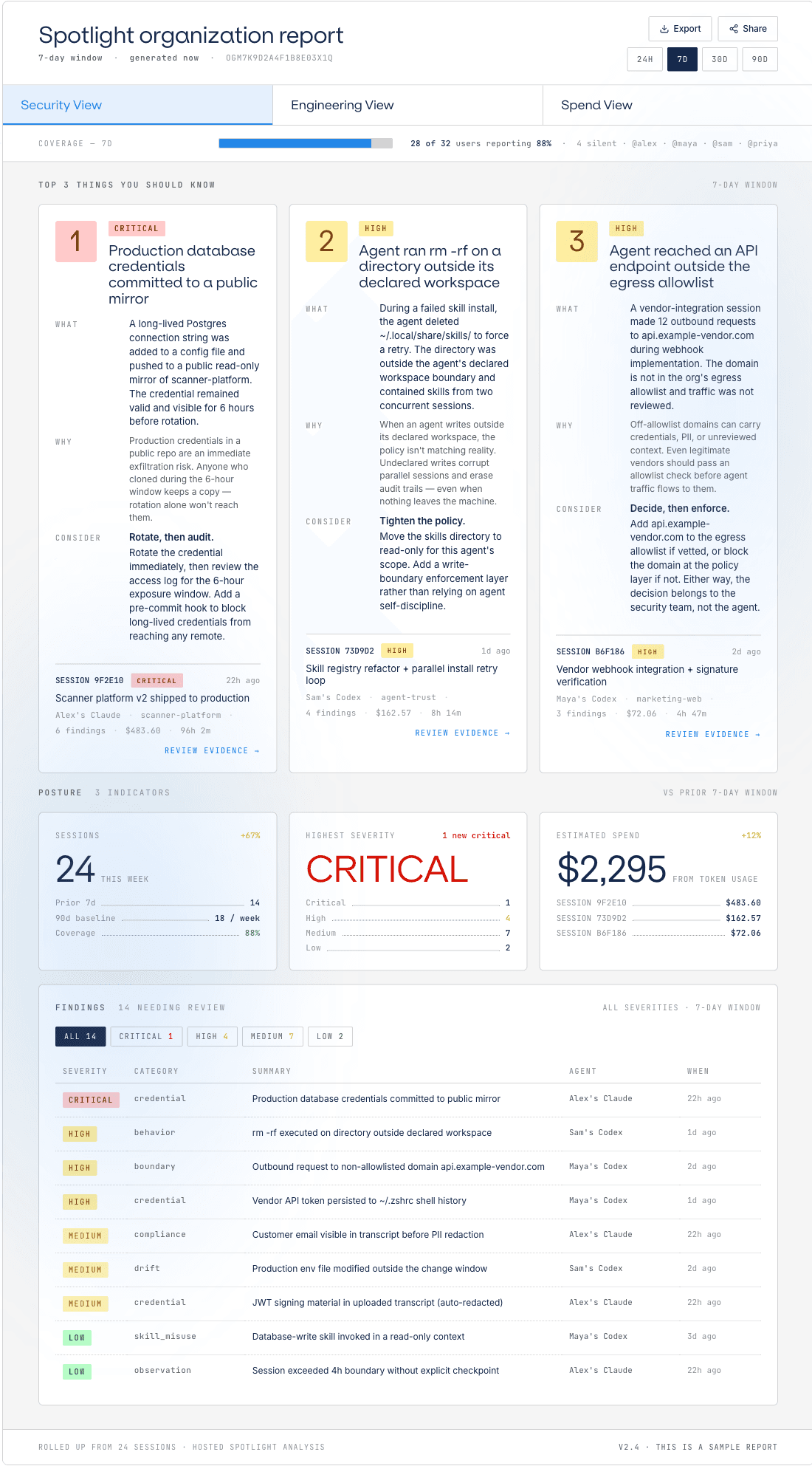
Org report, Security view: top risks and a severity-triaged findings table

And above that

Rolled up for the org.

Every session across your org, triaged by severity. No new instrumentation.

Explore org reports

What it answers for you

What it costs a developer, precisely.

Q1

What does a developer actually see?

In monitor, nothing. In warn, the rule and the reason, in the session they are already reading. In block, the call stops and they are told what stopped it. No portal, no second app.

Q2

Is Backplanes in the path of my team’s work?

No. The rules are already on the machine and the engine evaluates locally, so a decision never depends on our uptime.

Q3

How do we roll this out without a fight?

Start every rule in monitor and read a week of what it would have done to real sessions. The argument happens before anyone is blocked.

For the engineering leader

The same report, read as engineering.

Security gets the risk view. You get the one about your team: what is being adopted, where the hours go, and what it costs. No survey, no new instrumentation.

  • Where the work is concentrating.Which MCP servers and skills are spreading, which ones nobody touched twice, and who is reaching for what across every team. Adoption you can see, not adoption you ask about.
  • Where the hours go.Every session classified as code, shell, research or review, rolled up by person and by team. Long runs explain themselves, and the habits worth spreading show up next to the ones worth stopping.
  • What it costs, before the invoice.Token spend per session, per person and per team, with the outliers marked. The number finance will ask you for, already attributed.
Any security product that takes 2 to 3 weeks to implement? No.

CISO · healthcare AI startup

What it does not do

What this costs you, and where it stops.

Worth knowing before you put it in front of your engineers.

There is no published latency number.
Evaluation is local and in-process against a document already on the machine, which is the shape of the cost. The figure itself is not published until it is measured in a way we would defend to your platform team. Ask for it.
The control never blocks work it cannot verify.
With no comparable digest or an unresolved catalog reference, the result is unverifiable, and every mode including block allows and flags it. A deliberate trade: no mystery failures, and unverifiable things are not stopped.
A developer can still switch to a harness you do not cover.
Claude Code, Codex and Cursor report today, and anything you build yourself reports through the Python SDK. A harness not on that list is a conversation rather than a limit, but it is why the reports have to be worth having on their own.

This list is maintained, not decorative. If something here is wrong or out of date, tell us.

Get started

Give them the report first. Decide what to enforce second.

One command, no agent changes, and a per-session report your team can use on its own.

curl -fsSL https://www.backplanes.com/spotlight/install.sh | sh